

A dual camera system can help a driver check two rear-facing seats from the front without turning around. The options below differ in screen size, image detail, mounting, and camera adjustment. Treat listing claims as specifications to verify, then install the system without interfering with vehicle restraints or safe driving.
Selection note: Products and images on this page come from live catalog listings. We summarized listed features and have not independently tested these items. Confirm current specifications, package contents, safety instructions, compatibility, and care details before buying.
Affiliate disclosure: This article contains paid links. Babimommy may earn a commission if you purchase through one.
What matters when comparing dual baby car camera for twins
For two-seat families, screen layout is only one part of the decision. Camera position and installation determine whether the view is actually useful.
Compare screen size, camera count, split-screen behavior, night-view features, power connections, and cable routing. A camera system is a convenience aid and should never distract the driver.
Split-screen systems for two seats
1080P Dual Baby Car Camera for 2 Kids: 7.2” Split Screen Monitor for Twins | Auto-Brightness Car Seat Camera with Cable Clips – Organizes Cables for Neat & Easy Setup for Road Trips and Daily Commutes

Fodkh’s 7.2-inch split-screen setup is listed for two children, with dual cameras and automatic brightness. The larger screen can make two views easier to check, but placement and glare matter inside a moving car.
Potential benefit: Dual-view layout and automatic brightness are stated; designed around two rear seats.
Installation note: Confirm camera count and cable routing in your package. Do not install in a way that blocks the driver’s view.
View Product (paid link)
Babyvue BV6Plus 7.2" Wireless Dual Baby Car Camera for Fast Setup | Anti-Glare Split Screen Monitor for 2 Kids, 1080P Auto Night Vision, Battery-Powered Wireless Cameras, Wired Display
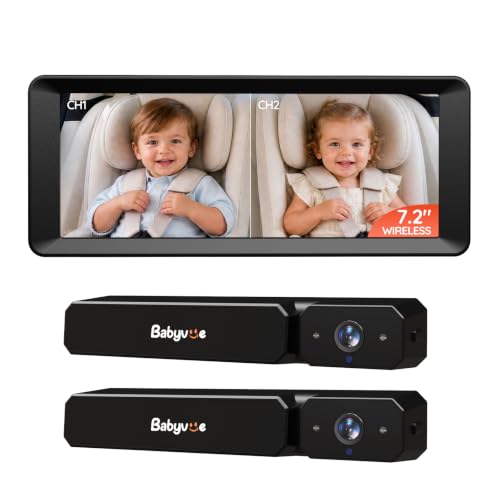
Babyvue BV6Plus is described as a wireless dual-camera system with anti-glare split screen. Wireless setup may reduce cable runs, but check charging, pairing, and camera placement details before relying on it for a trip.
Potential benefit: Wireless dual-camera format; split-screen and anti-glare features are listed.
Installation note: “Wireless” can refer to the camera connection, not necessarily power. Verify all power requirements and install securely.
View Product (paid link)
KOUENOM Dual Car Camera Baby Monitor with 6.9" Split Screen | 1080P Carseat Camera for 2 kids with 360° Rotation-Night Vision, 2 Power Ways, Easy Install-for Twins & Siblings

KOUENOM’s model specifies a 6.9-inch display, 1080p camera view, and split-screen for two kids. Those headline specs make it easy to compare against larger screens, while exact night-vision and mounting performance should be checked in the listing.
Potential benefit: Two-child split screen and 1080p claim are stated; screen size is specified.
Installation note: Check camera adjustment range and whether both views remain clear at your seat spacing.
View Product (paid link)
Rohent Dual Baby Car Camera for 2-Kids: 6.9” HD Split Screen 1080P | Auto Brightness Backseat Camera for Twins Infrared Night Vision – 360° Adjustable USB Easy Setup Ideal for SUVs Minivans

Rohent’s dual-camera option pairs a 6.9-inch screen with a 1080p split view and automatic brightness. It is suited to families comparing a larger dual display, but vehicle layout and cable reach will influence installation more than screen specs alone.
Potential benefit: Two cameras and split screen; automatic brightness is listed.
Installation note: Measure cable routes and screen mounting location first; keep cords away from airbags and driver controls.
View Product (paid link)
Screen and camera differences
Dual Baby Car Camera HD 1080P: 6.9" Split-Screen Monitor for 2 Kids & Twins | USB Easy Install Ideal for SUV Minivan – Auto Night Vision 150° Wide View Great Carseat Camera Quality

Wkzay lists a 6.9-inch split-screen monitor for two children and USB installation. The plug-in setup may be simple to power, though shoppers should confirm which vehicle adapter and cable length are included.
Potential benefit: USB power and two-view layout are highlighted.
Installation note: Check that your vehicle’s port location and cable length work with both car seats.
View Product (paid link)
bonoch 5" 1440P Baby Car Camera for 2 Kids, 360° Rotating Adjustable View | Dual Cameras, Split Screen Night Vision, Easy Setup Car Seat Monitor, USB Powered with Charger, Shower Gift for Parents

bonoch’s listing highlights dual cameras, split-screen night vision, and a 5-inch display. A smaller screen may take up less dashboard space than 7-inch alternatives, while still giving two views in one glance.
Potential benefit: Dual cameras and night vision are described; smaller display footprint.
Installation note: Compare display readability from the driver’s seat and confirm the monitor mount stays secure.
View Product (paid link)
Kidsneed 7 inch HD 1080P Split Screen Baby Car Camera for 2 Kids | Car Baby Monitor with Dual Backseat Cameras, 150° Wide View, 360°Rotation, Night Vision, Rear-Facing Infant Car Seat Mirror

Kidsneed’s 7-inch display is advertised with two backseat cameras and a wide viewing angle. The larger screen may be useful when checking two seats, but take time to aim each camera and confirm the view during daylight and at night.
Potential benefit: Large display and dual-camera layout; wide angle is listed.
Installation note: A larger screen can occupy more dashboard area. Keep it outside the driver’s forward sightline.
View Product (paid link)
Babyvue BV3 MAX Dual Baby Car Camera Monitor, 7.2 Split Screen for 2 Kids | 1080P Auto IR Night Vision, Rear Facing Car Seat View, Adjustable Brightness, Recording & Playback Support (White)

Babyvue BV3 MAX is listed as a 7.2-inch dual-camera monitor with 1080p and infrared night vision. These specs provide a clear basis for comparison, though image quality depends on mounting, lighting, and the specific car interior.
Potential benefit: Two-seat layout, screen size, and night vision are named features.
Installation note: Confirm the exact camera package and power method, then follow the manufacturer’s vehicle installation directions.
View Product (paid link)
Installation questions before a trip
Install the display and cameras according to the vehicle and product manuals. Secure cables away from airbags and controls, keep the monitor outside the driver’s sightline, and make any adjustments while parked.
How to choose in one minute
Start with the product’s size and intended use, then compare the features that matter for your home. Listing details and image variants can change, so review the live product page before ordering.
Final thoughts
The right choice depends on your space, routine, and the manufacturer’s instructions. This roundup is based on product listing information, not hands-on testing; verify current details and use products as directed.





Write Your Review
No reviews yet. Be the first to share your experience!